
At the December 10, 2025 panel discussion on “Combating Financial Fraud & Cyber Threats,” the panelists explored three real-life scenarios.
We also for a “Top 10” list of actions PRO New England members should pursue immediately to increase security, decrease vulnerability, and reduce risk.
This list was generated by Cambridge Savings Bank Chief Information Security Officer Brian Landry.
Our panelists and their teammates are available for private follow-up conversations and consultations:
 |
Brian Landry, Chief Information Security Officer • blandry@cambridgesavings.com
Brooke Jaillet, Assistant Vice President and Small Business Relationship Manager • bjaillet@cambridgesavings.com |
|
 |
Martin LaChance, CEO • martinl@citarasystems.com
Jim Coburn, VP of Sales • jcoburn@citarasystems.com |
|
 |
Brian Robertson, Senior Producer & Risk Manager • brian@candsins.com |
Cambridge Savings Bank Top Cyber Resilience Recommendations*:
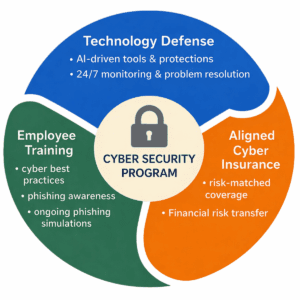
- Passphrases not passwords – use passphrases for access to systems, short sentences or phrases from a TV show, movie, book, poem, etc. with spaces and punctuation. The longer the passphrase the better, 14+ characters is much harder to crack, and a real phrase is easy to remember!
- Implement Multifactor Authentication (MFA) – Turn on MFA or Two-Factor Authentication on for everything you use if possible. Use an authenticator app and not text (SMS) if possible.
- Regularly Patch and Update Software and Systems – Patch your computer operating systems, all the applications you use, and update the firmware on all of the devices (firewalls, routers, switches, laptops, desktops, desk phones, mobile phones, printers, copiers, etc.) you use.
- Train employees in cybersecurity awareness – provide resources for good cybersecurity hygiene, password management, phishing training, etc.
 Back up your data to something that is not part of the system itself:
- If you have servers back them up to something in the cloud or offline.
- If you use cloud solutions, get a solution to back them up. For example, if you use QuickBooks Online, use a third-party to back up your financial data, some options: Dropsuite, Redstor, Rewind, SafetyNet, Skyvia, SysCloud
- Incident Response Plan and Disaster Recovery / Business Continuity (DR/BC) – have a vendor or if you have IT people create a plan for what to do if something bad happens and run through it at least once a year to see if you are missing anything.
- Cyber and Fraud Insurance Coverages – talk to your broker about what coverage you have or need for cyber incidents and financial fraud losses.
- Vendor Payment Instructions – Have a defined process for updating vendor payment instructions including callbacks. DO NOT just accept payment instruction changes via email!
- Conditional Access for collaboration systems (Email, Teams, Slack, SharePoint, etc.) – If you use a system like Microsoft 365 you should have your IT people or your technology consultants configure conditional access policies to make sure only your people, and your systems can access your data.
- Do not allow browser extensions – most companies do and they are fraught with security issues. Your email (Outlook) and document solution (Word) have grammar and spell checkers; you do not need Grammarly in your browser.
 Back up your data to something that is not part of the system itself:
*Legal Disclaimer: The information provided herein is for general informational purposes only and does not constitute professional, consulting, legal, financial, or other expert advice. No client, advisory, or fiduciary relationship is created by your use of this information. You should not act or refrain from acting based on any content without seeking appropriate independent professional guidance relevant to your specific circumstances. The provider of this information disclaims all liability for actions taken or not taken based on the contents of this material.